+91 99980 88430 | +91 95589 17778
  info@convello.in | sales@convello.in
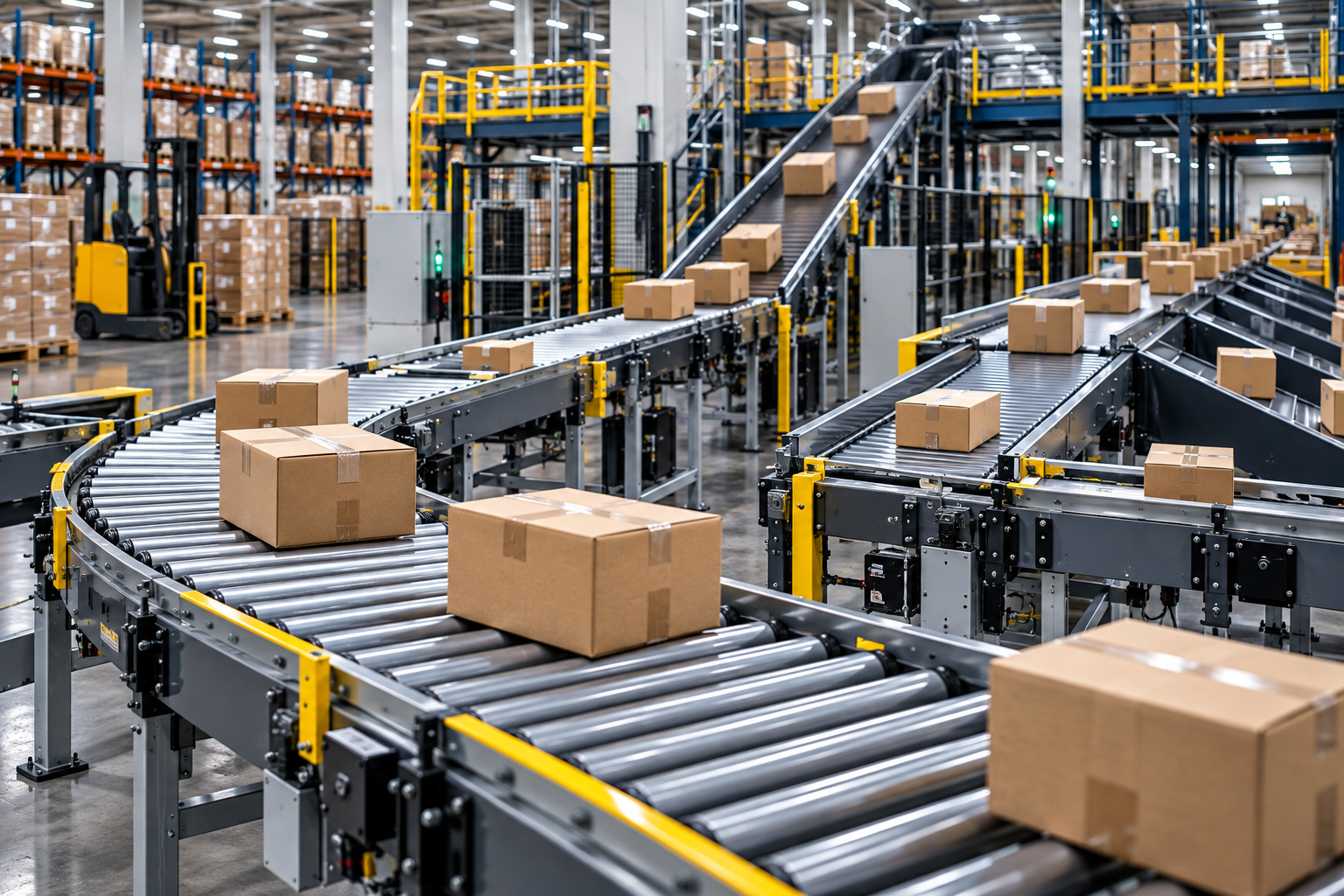
Most warehouse conveyor projects do not begin because somebody wants more machinery. They begin because a familiar shift keeps becoming harder to control. A picker walks the same thirty metres hundreds of times. Packing benches disappear behind waiting cartons. A forklift is called to “help for ten minutes” and ends up rescuing the flow every afternoon. Then the carrier cutoff wave arrives, one scanner starts rejecting labels, and the neat line shown on the layout becomes a queue across the floor.
That is the human side of warehouse automation: the problem is rarely that products cannot move at all. The problem is that they do not move predictably between people, processes and decisions. Receiving can unload faster than putaway can absorb. Picking can release work faster than packing can complete it. A sorter can send cartons quickly, but only if the destination lane is ready. One awkward handoff is enough to make a fast conveyor look slow.
The best warehouse conveyor systems are therefore not selected by asking, “How many metres of conveyor do we need?” A better question is, “Where does flow lose control, and what must happen at that point?” The answer may be powered roller zones, a belt section for soft packs, a gravity lane beside a packing station, a cross transfer into an exception route, or a telescopic conveyor that reaches inside a truck. In a real facility, it is usually a combination.
This guide explains which conveyor types fit the main warehouse tasks, how to compare them, what data to collect, and where automation projects most often go wrong. The focus is practical: cartons, totes, bags, pallets, peaks, no-read labels, blocked lanes, maintenance access and the people who must keep the system moving when something unexpected happens.
What Are Warehouse Conveyor Systems?
Warehouse conveyor systems are mechanical and controlled material-handling arrangements used to move, buffer, merge, divert, elevate, inspect or present cartons, totes, bags, pallets and other handling units between warehouse processes. They may be simple gravity lanes or a connected automated network with sensors, drives, scanners, controls and software interfaces.
A conveyor system can support receiving, putaway interfaces, replenishment, picking, order consolidation, packing, weighing, labelling, sortation, dispatch staging and truck loading. The useful output is not movement alone. It is a reliable handoff: the right handling unit arriving at the right place, in the right orientation and at a rate the next process can accept.
| Shop-floor reality A warehouse can own a fast conveyor and still have poor flow. Watch what happens when a carton is damaged, a barcode will not read, a destination lane is full or the next truck is late. The recovery path reveals whether the system was designed for operations or only for the presentation drawing. |
Why Warehouse Problems Appear at the Handoffs
Travel is visible, so it receives attention. Handoffs are smaller and easier to ignore: lifting a carton from a picking trolley, turning it for a label scan, waiting for a free packing position, pushing it onto a gravity lane, or carrying it the final distance into a vehicle. Each action may take only a few seconds. Across thousands of orders, those seconds become labour, congestion and missed dispatch capacity.
The pattern is especially clear during peaks. The average hour may look comfortable, yet a promotion, marketplace sale, replenishment wave or carrier cutoff compresses the same work into a shorter window. Cartons then arrive in bursts rather than a smooth stream. If accumulation, release logic and exception handling were sized only from the daily average, operators become the buffer.
A useful site walk is to follow one order from receipt or pick release to the truck. Count every lift, push, re-scan, wait, temporary floor placement and forklift touch. Then repeat the walk during the busiest hour. The gap between those two journeys is often the true automation opportunity.
Map the Warehouse Operation Before Choosing Equipment
Start with the material flow, not a conveyor catalogue. Draw the route of each major handling unit and mark the decision points: receive, inspect, store, replenish, pick, consolidate, pack, weigh, label, sort, stage and load. Add rework and exception routes as real flows, not dotted lines that somebody will “handle manually.”
- Record the minimum, typical and maximum dimensions and weight of cartons, totes, bags and pallets.
- Observe the underside: flat and rigid, bowed, taped, ribbed, soft, damaged or overhanging.
- Measure normal hourly volume, short peak bursts, carrier cutoff waves and seasonal multipliers.
- List every point where items stop, merge, queue, change direction, change elevation or transfer between surfaces.
- Capture scan, weigh, print-and-apply, inspection and rejection cycle times.
- Ask operators where they create temporary overflow when the formal lane is full.
- Note pedestrian routes, forklift crossings, fire exits, columns, doors, mezzanines and maintenance access.
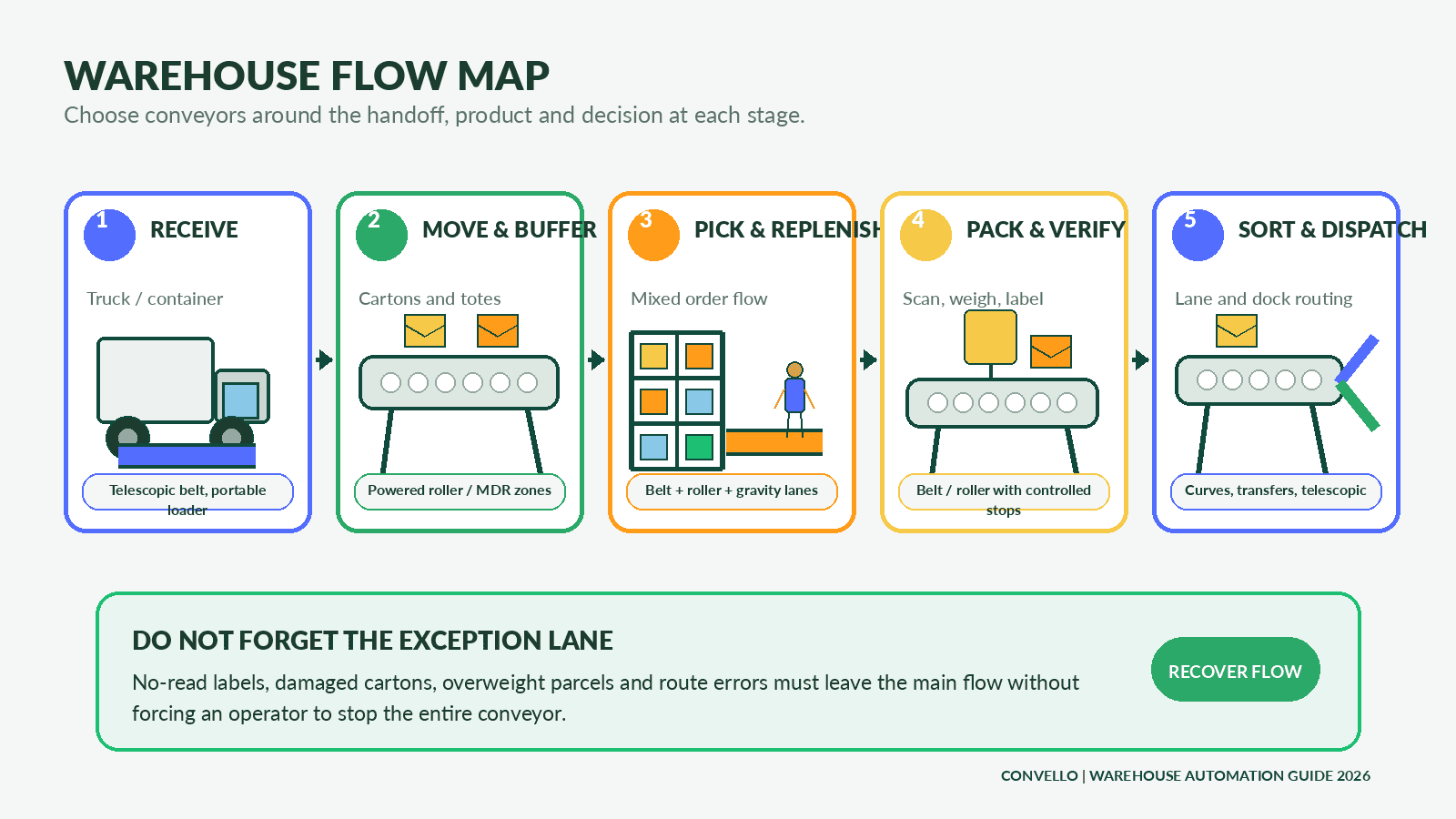
Warehouse flow map: select equipment around the product and decision at each stage, while giving no-read and damaged items a defined exception route.
Best Conveyor Systems for Warehouse Automation
There is no single best conveyor for every warehouse. A rigid carton behaves differently from a poly mailer; a pallet is not simply a heavier carton; and a loading dock has different demands from an internal accumulation lane. The following conveyor types are the most useful building blocks for warehouse automation.
1. Powered roller conveyors for cartons and totes
Powered roller conveyors are often the first choice for stable, flat-bottom cartons, plastic totes and trays. They support controlled transport, zones, merges, diverts and accumulation. Motor-driven roller or zoned arrangements can release handling units only when the next section is available, which helps prevent pressure building through a queue.
Use them for long carton routes, controlled accumulation, scanning lines, packing take-away, lane routing and connections between process areas. Check roller pitch, minimum product length, base rigidity, load per zone, gaps and transfer support.
2. Gravity roller conveyors for simple manual flow
Gravity rollers are valuable because they are simple. At packing benches, quality-check areas, dispatch staging or short declines, they can move rigid cartons without a powered drive. They also make practical low-cost FIFO lanes when the slope, stops and operator access are designed correctly.
Use gravity where the process can tolerate manual release or controlled slope. Do not expect it to provide automatic spacing, positive speed control or long, level transport without assistance.
3. Belt conveyors for bags, poly mailers and irregular items
A continuous belt supports products that may bridge poorly across rollers: bags, soft packs, poly mailers, small components, cartons with weak bottoms and mixed-size items. Belt conveyors can also provide grip on an incline and a stable surface through scanning, weighing or manual inspection zones.
Select belt material, surface, width, tracking, cleaning and side guides around the actual product. Small items and loose straps can create issues at transfers if gaps and return-side protection are not engineered.
4. Curve roller conveyors for direction changes
Curve roller conveyors turn rigid cartons and totes while keeping them moving through a compact route. A well-selected curve can avoid a stop-and-transfer arrangement and reduce the floor space lost to square corners.
Check the product swept envelope, centre of gravity, speed, side guides, roller taper, width and support through the inside and outside of the curve.
5. Telescopic belt conveyors for fixed loading docks
A telescopic belt conveyor extends into a truck or container, bringing the conveying surface closer to the operator and reducing repeated walking and carrying. It is especially useful where one or more fixed dock doors handle regular carton, parcel or bag volumes.
Match extension, retracted length, belt width, loading height, vehicle range, daily duty and upstream controls. The dock traffic plan and safe operator position matter as much as the boom length.
6. Flexible scissor roller conveyors for changing dock work
An expandable flexible conveyor can be moved, curved, extended and stored. It suits multiple doors, temporary peaks, courier operations, receiving overflow and warehouses where the loading point changes.
Choose gravity or powered operation from the required control and throughput. Check floor condition, castor locks, stability, storage space and the smallest package footprint.
7. Pallet conveyors for heavy unit loads
Pallet roller or chain conveyors create controlled movement for heavy unit loads between receiving, staging, production supply, storage interfaces and dispatch. They can integrate with transfers, turntables, lifts and automated storage equipment where required.
Record pallet dimensions, runner direction, underside condition, maximum weight, load distribution, forklift impact, accumulation load and safe access.
8. Spiral and inclined conveyors for level changes
Inclined belt conveyors and spiral conveyors move products between floors, mezzanines or raised process levels. Inclines are often simpler where enough horizontal run is available; spirals can reduce footprint where continuous flow must rise within a compact area.
Check product stability, incline angle, grip, cleats, side containment, transfer elevations, throughput and access for cleaning or maintenance.
9. Cross transfers and pop-up transfers for lane changes
Cross transfers move a product at ninety degrees between parallel conveyors or into a side lane. They are useful for route selection, quality hold, rework, pallet movement and balancing work between stations.
The product must remain supported during the change of direction. Check underside contact, orientation, lift stroke, cycle time, sensors and the control handshake with both conveyors.
10. Hybrid systems for real warehouse flow
Most effective warehouse systems combine several technologies. A telescopic belt may feed a powered roller line; belt sections may carry bags through a carton system; gravity lanes may serve packers; curves and transfers may route completed orders; and pallet conveyors may operate separately for bulk replenishment.
A hybrid design is not a compromise. It is often the correct response to mixed handling units and different levels of control across one operation.
| Conveyor type | Best suited to | Typical warehouse role | Critical design check |
| Powered roller / MDR | Rigid cartons, totes, trays | Transport, accumulation, scanning, merge and divert | Minimum footprint, roller pitch, zone load and transfer gaps |
| Gravity roller | Rigid flat-bottom cartons | Short manual lanes, staging and FIFO | Slope, safe stops, runaway load and manual reach |
| Belt conveyor | Bags, mailers, small or irregular items | Continuous support, incline, scan/weigh and mixed handling | Belt grip, tracking, cleaning and transfer gap |
| Curve roller | Cartons and totes | Direction change in limited floor space | Swept envelope, speed, guides and product stability |
| Telescopic belt | Cartons, parcels and bags | Fixed dock loading and unloading | Vehicle depth, dock height, extension and duty cycle |
| Flexible scissor roller | Cartons and parcels | Mobile or temporary dock and dispatch flow | Package base, castor locks, floor condition and storage |
| Pallet conveyor | Pallets and heavy unit loads | Staging, transfer and storage interfaces | Pallet underside, runner direction, weight and impact |
| Spiral / inclined conveyor | Cartons, totes and suitable bags | Mezzanine or inter-floor movement | Footprint, angle, grip, containment and access |
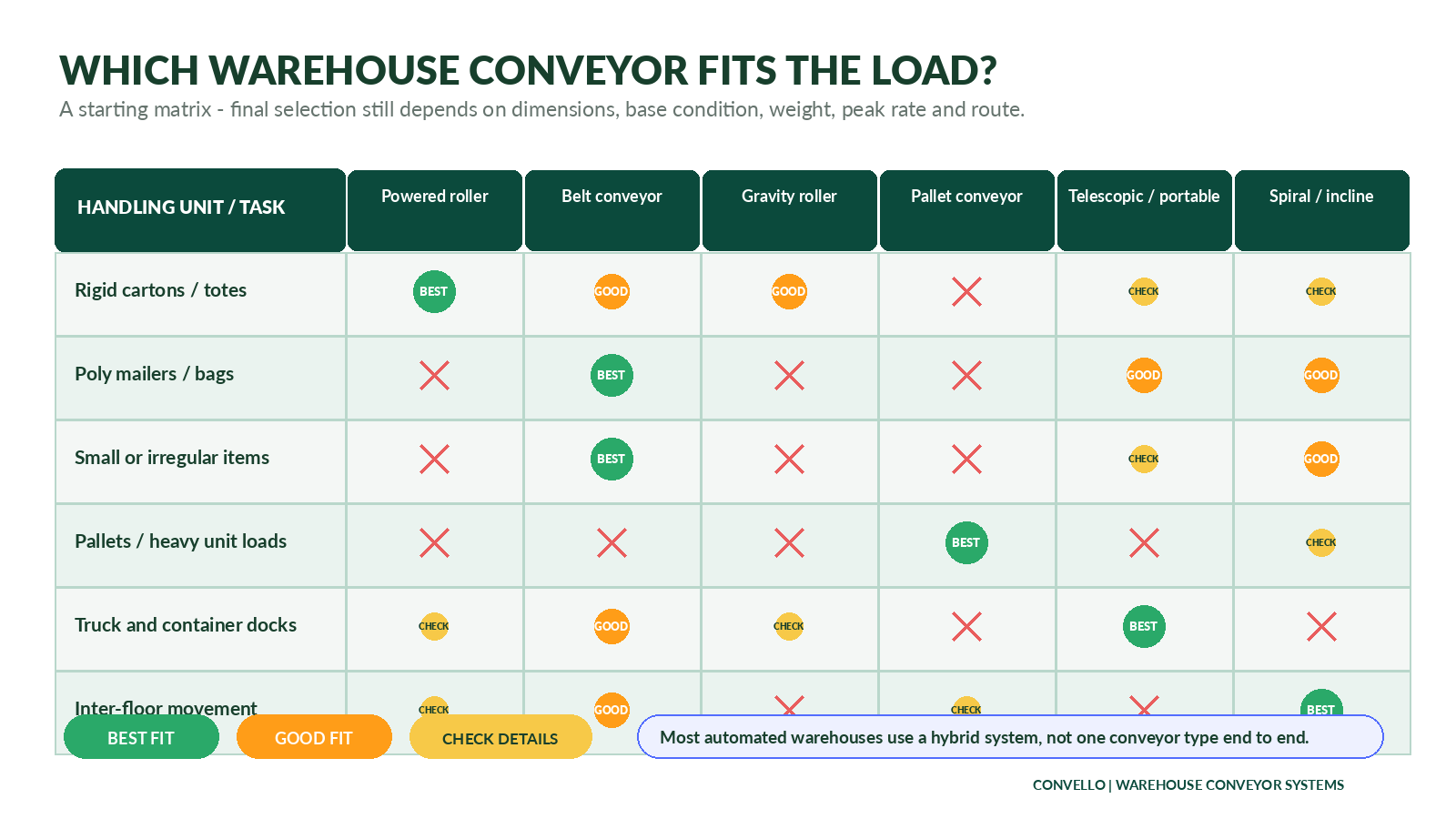
Selection matrix: use it as a starting point only. Product base condition, minimum size, peak rate, route and interfaces can change the final recommendation.
Conveyor Choices by Warehouse Process
| Warehouse process | What the conveyor must achieve | Common starting options |
| Receiving and unloading | Reduce carrying inside vehicles; meter inbound flow; create inspection or putaway buffer | Telescopic belt, portable loader, flexible scissor conveyor, powered or gravity roller |
| Putaway interface | Present cartons or pallets to forklifts, pallet trucks, lifts or storage automation | Powered roller, pallet conveyor, transfer modules, short gravity lanes |
| Replenishment | Move stock from reserve storage toward pick faces without repeated manual travel | Belt, powered roller, gravity lanes, pallet conveyor |
| Picking and consolidation | Bring picked items or totes to order consolidation and maintain order identity | Powered roller zones, belt conveyors, tote lanes, cross transfers |
| Packing | Feed work at a manageable rate and remove completed cartons from benches | Gravity infeed lanes, powered take-away, belt or roller scan/weigh sections |
| Verification | Stop or control products for scanning, weighing, dimensioning and label application | Belt or powered roller with sensors and controlled gaps |
| Sortation and dispatch | Route completed orders to carrier, route, dock or staging lane | Powered roller, curves, transfers, sortation modules, gravity takeaway lanes |
| Truck loading | Bring products closer to the loading point and reduce internal travel | Telescopic belt, portable loading conveyor, flexible scissor conveyor |
Receiving and Inbound Movement
Receiving is where the warehouse first learns whether the day will be calm or difficult. A vehicle may arrive late, two suppliers may reach the dock together, cartons may be mixed by size, and putaway may not be ready. An inbound conveyor should therefore do more than unload. It should create a controlled bridge between vehicle work and the internal process.
For regular carton or parcel volume at a fixed dock, a telescopic belt can reduce the distance operators walk inside the vehicle. A flexible conveyor is often more practical when doors change, volumes are intermittent or the same equipment must serve receiving and dispatch. Downstream powered roller zones can meter cartons into scanning or inspection instead of allowing the dock to release a sudden wall of product.
| Human check at receiving Stand beside the unload team for one full vehicle. Note where people twist, where cartons are put down “for a moment,” which packages require two hands, and what happens when the first inspection position is occupied. Those observations are more useful than an average cartons-per-hour figure by itself. |
Replenishment, Picking and Order Consolidation
Picking automation is often discussed as if the conveyor replaces the picker. In many warehouses, its more valuable job is to remove low-value travel around the picker. A person should spend time selecting, checking and building the order – not repeatedly walking a completed tote to a distant consolidation point.
Powered roller zones suit totes and rigid cartons where identity and spacing must be preserved. Belt sections handle bags or small items that rollers cannot support reliably. Gravity lanes can present replenishment cartons or create simple FIFO at a workstation. The best arrangement depends on whether orders move as individual items, totes, cartons, batches or waves.
Do not ignore the return journey. Empty totes, reusable trays, rejected orders and packing consumables all create reverse flow. When these routes are not planned, they reappear as trolley traffic across the same aisles the automation was meant to clear.
Packing, Verification and Sortation
A packing line needs rhythm, not pressure. If completed cartons arrive faster than operators can verify, label or close them, products pile around the bench. If take-away is unreliable, packers stop productive work to clear the area. A short gravity infeed, controlled work position and powered takeaway can be more useful than simply increasing the speed of the main conveyor.
Scanning, weighing, dimensioning and print-and-apply equipment introduce decision time. Product gaps must be large enough for reliable sensing, but not so large that the conveyor wastes capacity. No-read items need a route to inspection or rework. A system that stops the entire line whenever one label fails will feel impressive during a demonstration and frustrating during a real peak.
Dispatch lanes should be treated as limited-capacity resources. The control logic needs to know what happens when a lane is full, a truck is not ready or a carrier changes the loading sequence. Automatic routing is only as strong as the physical space and recovery method at the destination.
Fifteen Design Factors That Decide Performance
1. Define the handling unit, not just the product
The warehouse may sell individual items but move totes, cartons, bags or pallets. Conveyor design follows the physical handling unit. Record packaging changes, open totes, overfilled cartons and damaged bases.
2. Capture minimum, typical and maximum dimensions
The shortest item controls roller support and sensor detection. The widest item controls conveyor width, guides and swept envelope. The longest item affects curves, merges and accumulation position length.
3. Record weight and load distribution
A total weight figure is incomplete. An off-centre load, dense corner, sagging bag or pallet with broken runners can behave very differently from a balanced unit.
4. Understand the order and demand profile
Average daily orders hide waves, promotion peaks, carrier cutoffs, replenishment bursts and seasonal change. Design from a credible operating profile, not one headline number.
5. Calculate sustainable peak throughput
Use the slowest required process – scanner, merge, pack bench, sorter, lift or dock – when defining sustainable system capacity. Mechanical top speed is not the same as delivered throughput.
6. Design accumulation intentionally
Decide where products are allowed to wait, how many positions are needed, whether contact is acceptable and how the system restarts. Accumulation should protect a known constraint, not become permanent storage.
7. Plan the route around people and building constraints
Columns, aisles, fire exits, doors, low beams, mezzanines and forklift crossings influence the layout. A shorter route is not automatically better if it blocks access or creates unsafe interaction.
8. Engineer every transfer point
Most jams and product damage occur where one surface hands the load to another. Check gaps, height mismatch, speed difference, nose radius, side guides and support for the smallest product.
9. Protect product orientation and label visibility
Barcode readers, label applicators and sortation decisions may depend on one face of the carton. Curves, merges and manual handling can rotate products unless orientation is designed and tested.
10. Define exception and recovery routes
No-reads, damaged cartons, overweight items, blocked destinations and unknown routes are normal operating cases. Provide a controlled way to remove, inspect and reintroduce them.
11. Match dock equipment to vehicle variation
Vehicle depth, door width, dock height, floor condition and loading pattern affect telescopic and portable equipment. Include the smallest and largest vehicles, not only the most common truck.
12. Agree the control hierarchy and interfaces
Clarify what the PLC controls locally, what routing data arrives from warehouse software, how confirmations return, and who owns a product when a message or sensor fails.
13. Design safety and access from the beginning
Guard drives and trapping points, provide appropriate stops and safe access, separate people and vehicles where practical, and plan isolation for maintenance. The final safety package requires a project-specific risk assessment.
14. Make maintenance physically possible
Provide access to motors, rollers, belts, sensors and transfers. A component that is technically replaceable but trapped behind racking or a wall will create long downtime.
15. Leave a sensible path for change
SKU mix, carriers, pack formats and volumes will change. Modular zones, spare control capacity, planned tie-in points and clear documentation can make expansion less disruptive.
Peak Throughput, Accumulation and Bottlenecks
A useful conveyor calculation begins with release interval. If a line must handle 1,200 cartons per hour, the average release interval is three seconds. That does not mean every carton will arrive exactly three seconds apart. The layout must absorb the real burst pattern and the slowest downstream cycle.
| Core planning formulas Average release interval (seconds per unit) = 3,600 ÷ required units per hourRequired line speed (metres per minute) = product pitch (metres) × required units per minuteIllustrative buffer positions = net arrival rate during a stoppage × expected stoppage durationThese are planning tools, not a substitute for product testing, control logic and detailed engineering. |
| Illustrative input | Value | Design meaning |
| Average shift rate | 650 cartons/hour | Useful for labour and energy planning, but too low for peak sizing |
| Normal busy hour | 950 cartons/hour | Represents regular operating demand |
| Carrier cutoff wave | 1,300 cartons/hour for 35 minutes | May determine conveyor, scanner and dispatch capacity |
| Short release burst | 1,500 cartons/hour for 8 minutes | Tests accumulation and merge logic |
| Downstream verification capacity | 1,100 cartons/hour | Creates a bottleneck unless work is balanced, buffered or rescheduled |
In the example above, increasing the upstream conveyor to 1,500 cartons per hour does not solve the problem. Verification can sustain only 1,100. The project needs to improve that process, release work differently, create a deliberate buffer, add parallel capacity or accept a queue. The correct answer depends on operations, not on motor speed.
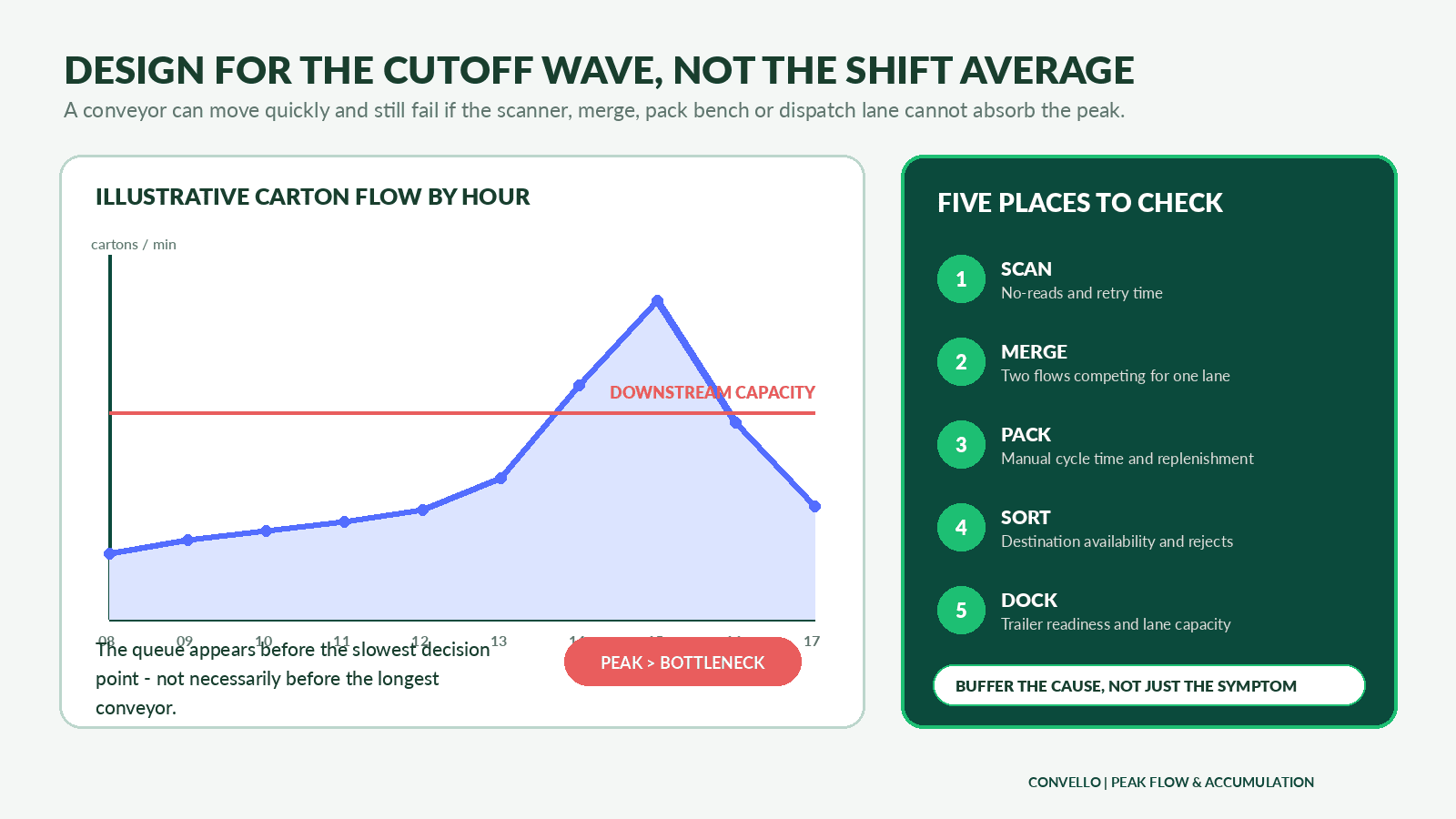
Peak-flow map: identify the decision point that limits sustainable output, then size accumulation and recovery around its actual stoppage pattern.
Controls, Scanners and Warehouse Software Integration
Warehouse conveyors become automation systems when movement is connected to decisions. Sensors detect position and gaps. Local PLC logic starts, stops and interlocks equipment. Barcode or RFID data identifies the handling unit. Higher-level warehouse systems may release work, provide destinations, receive confirmations and monitor exceptions. The exact terms – WMS, WCS or WES – vary by project and supplier, so responsibilities should be written in plain language.
- What identifier is read, and where is it first attached or associated with the order?
- What happens after a no-read, duplicate read or data timeout?
- Which system chooses the destination, and which system confirms the physical divert?
- How does the conveyor behave when a destination lane is full or unavailable?
- Can operators recover a product safely without corrupting tracking data?
- Which alarms are actionable, and who receives them?
- What production and fault history is stored for improvement and support?
- How will controls be tested before peak go-live?
A good control philosophy does not eliminate manual recovery; it makes recovery clear and safe. Operators should know why the system stopped, which product caused the condition and what approved action restores flow. A screen filled with generic red alarms is not useful automation.
Safety, Ergonomics and the Operator Experience
Conveyors can reduce carrying, pushing and forklift interaction, but they introduce moving parts, pinch points, stored energy and new traffic patterns. Safety should be engineered through risk assessment, guarding, stops, interlocks, safe access and documented isolation rather than added after the line is installed.
Ergonomics also includes pace and recovery. A packer should not be forced to chase products because the release logic is too aggressive. A dock operator should not have to lean across a moving conveyor to reach controls. A jam-clear point should not require climbing over the line. The best indicator is often simple: during a busy hour, are people working with the system or constantly working around it?
| Three questions to ask operators Where do you wait? Where do you carry? Where do you improvise?Ask these questions separately to receiving, picking, packing, maintenance and dispatch teams. Each group sees a different part of the same flow. |
Illustrative Warehouse Improvement Scenario
Consider a mid-sized e-commerce warehouse handling rigid cartons, poly mailers and a smaller pallet replenishment flow. During normal hours, completed orders are pushed on trolleys from six packing benches to a shared scan-and-sort area. The process works in the morning. After 3:00 PM, packing releases accelerate, trolleys queue in the aisle, and dispatch staff repeatedly ask packers to separate urgent carrier orders.
| Process area | Current condition | Illustrative conveyor-led improvement |
| Packing infeed | Mixed totes and loose picked items arrive around the benches | Short gravity or powered presentation lanes create defined work positions |
| Completed order take-away | Packers leave the bench to place cartons on a trolley | Powered roller takeaway for cartons; belt section for mailers |
| Verification | One shared scan point receives irregular bursts | Controlled metering and separate no-read lane |
| Carrier routing | Staff manually identify and push orders to lanes | Scan-driven transfer or divert into carrier lanes |
| Dispatch staging | Lanes overflow when a truck is late | Defined accumulation limits, full-lane logic and overflow plan |
| Truck loading | Cartons are carried inside the vehicle | Telescopic or flexible loading conveyor based on dock pattern |
The most important change is not the length of conveyor installed. It is the removal of uncontrolled handoffs. Packing releases into a known position, completed products are separated by surface requirement, verification receives a controlled gap, no-read items leave the main line, and dispatch lanes have defined capacity. The operators still make decisions, but they no longer spend the peak moving the queue by hand.
This is an illustrative design discussion, not a quotation or promised performance result. Final equipment, capacity and financial value depend on site measurements, product testing, operating data and detailed engineering.
When a Conveyor Is Not the Right First Solution
Conveyors are powerful when flow is frequent, repeatable and linked to stable process points. They are less attractive when routes change daily, volume is very low, products are extremely variable, or fixed equipment would block access. Sometimes the first improvement should be better slotting, closer packing supplies, standard containers, a revised release schedule, mobile carts, an AGV/AMR study or clearer dock planning.
Do not automate confusion. If order priorities change informally, destination rules are unclear or packaging is inconsistent, a conveyor may move the problem faster. Standardise the process enough to define the decision points, then select the technology that supports them.
| Situation | Why a conveyor may not be first | Possible starting response |
| Very low or occasional movement | Fixed conveyor may not earn its space or cost | Carts, pallet trucks or shared portable equipment |
| Frequently changing route | A fixed path may reduce flexibility | Mobile conveyors, AMRs/AGVs or revised layout |
| Unstable packaging | Jams and product damage may dominate | Improve cartons, totes or load containment first |
| Unclear process ownership | Automation cannot resolve competing rules | Define release, routing and exception responsibilities |
| Single isolated bottleneck | A complete network may be unnecessary | Improve the workstation, scanner, merge or dock first |
Eight-Step Warehouse Conveyor Selection Process
- Walk the complete physical flow during a real busy period, including exceptions and reverse movement.
- Build a handling-unit profile with minimum, typical and maximum size, weight, base condition and packaging quality.
- Quantify normal demand, sustained peak, short bursts, cutoff waves, stoppages and seasonal change.
- Match roller, belt, pallet, dock and vertical conveyor surfaces to product behaviour and process role.
- Engineer transfers, merges, curves, buffers, scans, destination lanes and manual recovery points.
- Define control ownership, data handshakes, alarms, safety functions, guarding and maintenance access.
- Test representative good and bad products at realistic gaps, speeds and peak scenarios before acceptance.
- Measure delivered throughput, jams, no-reads, touches, travel and dispatch performance after go-live, then improve.
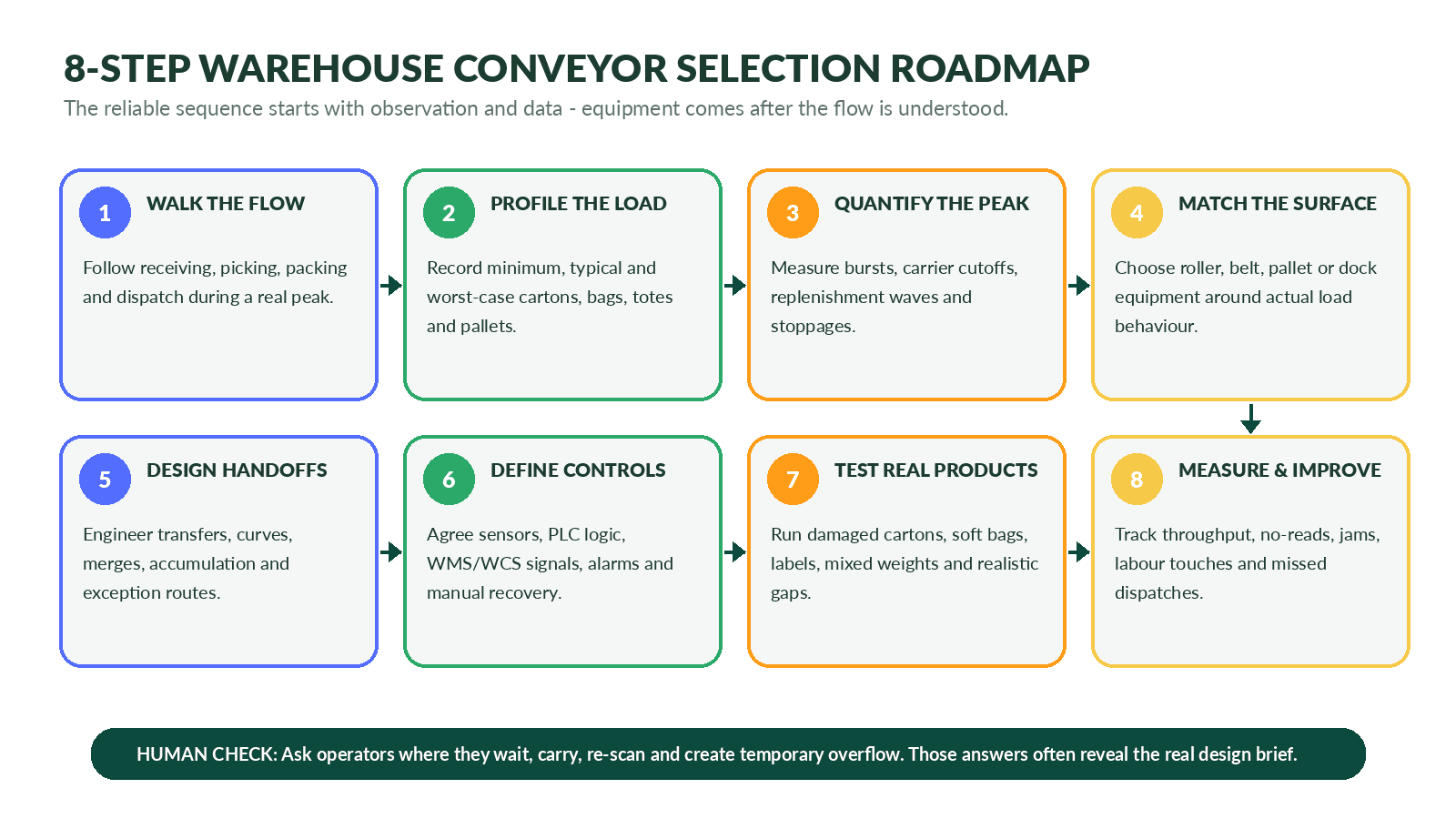
Selection roadmap: equipment choice sits in the middle of the process, after the flow and product are understood and before testing and continuous improvement.
Information to Share for an Accurate Warehouse Conveyor Quote
| RFQ item | Details to provide |
| Facility and process | Warehouse type, operating objective, receiving/picking/packing/dispatch scope and current bottleneck |
| Handling units | Cartons, totes, bags, pallets or mixed loads; photos and representative samples where practical |
| Dimensions | Minimum, typical and maximum length, width and height for every handling unit |
| Weight | Minimum, average and maximum weight, plus unusual or off-centre loads |
| Base condition | Flat, ribbed, bowed, taped, soft, damaged, pallet runner direction and overhang |
| Throughput | Normal hourly rate, sustained peak, short burst and expected growth |
| Flow logic | Origins, destinations, priority rules, merges, diverts, recirculation and exception handling |
| Accumulation | Required buffer positions, contact or no-contact preference and expected stoppage duration |
| Layout | Marked-up plan, route dimensions, columns, aisles, doors, fire exits, heights and level changes |
| Interfaces | Racking, pack benches, scanners, scales, label applicators, machines, lifts and dock equipment |
| Controls and data | PLC standards, WMS/WCS messages, barcode/RFID details, network and reporting requirements |
| Environment | Temperature, dust, moisture, washdown, hygiene, noise or corrosive conditions |
| Safety and access | Pedestrian and forklift routes, guarding expectations, isolation and maintenance access |
| Operating schedule | Shifts, hours per day, days per week, planned downtime and installation window |
| Acceptance | Test products, performance rate, accuracy, documentation, training and handover requirements |
| The fastest way to improve a quotation Send a short video that follows products from the current origin to the final destination during a busy period. Add a marked-up layout, handling-unit dimensions, peak-rate data and photographs of damaged or difficult packages. This often reveals more than a long generic equipment specification. |
Common Warehouse Conveyor Selection Mistakes
- Buying one conveyor type for every product because it simplifies the quotation.
- Sizing from average daily volume while ignoring carrier cutoffs and short release bursts.
- Treating all cartons as flat, rigid and undamaged.
- Adding accumulation without deciding how and why products will be released.
- Ignoring no-read, overweight, damaged and blocked-destination cases.
- Placing scanners or transfers where maintenance teams cannot reach them safely.
- Using conveyor speed as the primary productivity target.
- Forgetting empty tote, rework, reject and packaging-material return flow.
- Freezing the mechanical layout before control responsibilities are agreed.
- Testing only ideal products at a quiet rate before acceptance.
- Leaving operators to invent recovery procedures after go-live.
- Assuming a future extension will be easy without reserving physical and control capacity.
Frequently Asked Questions
1. Which conveyor is best for a warehouse?
For stable cartons and totes, powered roller conveyors are a common starting point because they support transport, zones and accumulation. Belt conveyors are better for bags, poly mailers and products needing continuous support. Most warehouses need a hybrid system.
2. What is the difference between a warehouse belt conveyor and roller conveyor?
A belt provides a continuous surface and suits soft, small or irregular items. Rollers suit rigid flat-bottom products and can provide low-friction transport, gravity flow or controlled powered zones.
3. Can one conveyor handle cartons, bags and totes?
Sometimes, but not always reliably. Mixed handling may need belt sections for bags and small items, with roller sections for cartons and totes. The smallest and least stable product should be tested at every transfer.
4. How do warehouse conveyors reduce labour?
They remove repeated travel, carrying, pushing and handoffs between stable process points. Labour savings depend on the current method, volume, staffing pattern and whether people can be redeployed to higher-value work.
5. What is accumulation in a warehouse conveyor?
Accumulation allows products to wait in controlled positions when the next process is temporarily unavailable. It may be contact or zero-pressure depending on product and system design.
6. How is conveyor throughput calculated?
A simple starting point is units per hour divided into 3,600 to obtain average seconds per unit. Sustainable throughput must also account for product pitch, scans, merges, diverts, lifts, pack stations, destination capacity and stoppages.
7. When should a warehouse use a telescopic conveyor?
Use it where regular loading or unloading volume at a fixed dock justifies extending the conveyor into trucks or containers. Vehicle range, dock geometry, daily duty and upstream flow determine the configuration.
8. Are flexible conveyors suitable for warehouses?
Yes, particularly for temporary peaks, courier operations, multiple doors and layouts where equipment must be moved or stored. Product footprint, floor condition and required control determine whether gravity or powered operation is suitable.
9. Can conveyors integrate with barcode scanners and WMS software?
Yes. Sensors and PLCs can coordinate movement, while scanners and warehouse software provide identity and routing data. The message ownership, timeout behaviour and exception process must be defined during engineering.
10. How much space is required for a warehouse conveyor system?
Space depends on conveyor width, curves, supports, accumulation, operator access, guarding, maintenance clearances and the full swept envelope of products. A layout should include building and traffic constraints, not just the conveyor centreline.
11. What safety features should be considered?
Project-specific risk assessment may lead to guarding, emergency stops, pull cords, interlocks, warning devices, safe access, isolation provisions and traffic controls. Requirements depend on the machine and site.
12. What information is needed for a warehouse conveyor quotation?
Provide handling-unit dimensions and weight, base condition, normal and peak throughput, route, accumulation, transfers, scan and control requirements, environment, operating hours, layout drawings and site photos or videos.
13. How do I know whether to automate the whole warehouse or one area?
Start with the handoff causing the greatest repeat travel, queue, safety exposure or missed capacity. A targeted project can prove the data and operating method before a wider network is installed.
Conclusion: Build Flow Around the Real Warehouse Day
The right warehouse conveyor system is not the one with the longest route or highest brochure speed. It is the one that keeps the difficult parts of the day under control: the cutoff wave, the no-read carton, the late truck, the soft mailer, the blocked lane and the maintenance call at the worst possible time.
Start by observing the handoffs. Profile the loads honestly. Measure the peak. Give products a controlled place to wait and a clear exception route. Then combine roller, belt, pallet, loading, transfer and vertical conveyor modules according to the task each one performs best.
| Discuss a warehouse conveyor requirement Share a marked-up layout, product or package dimensions, weight range, normal and peak volume, accumulation needs, dock details, scanner or software interfaces and a short process video with Convello. The more closely the brief reflects a real busy shift, the more useful the proposed conveyor system will be. |