+91 99980 88430 | +91 95589 17778
  info@convello.in | sales@convello.in
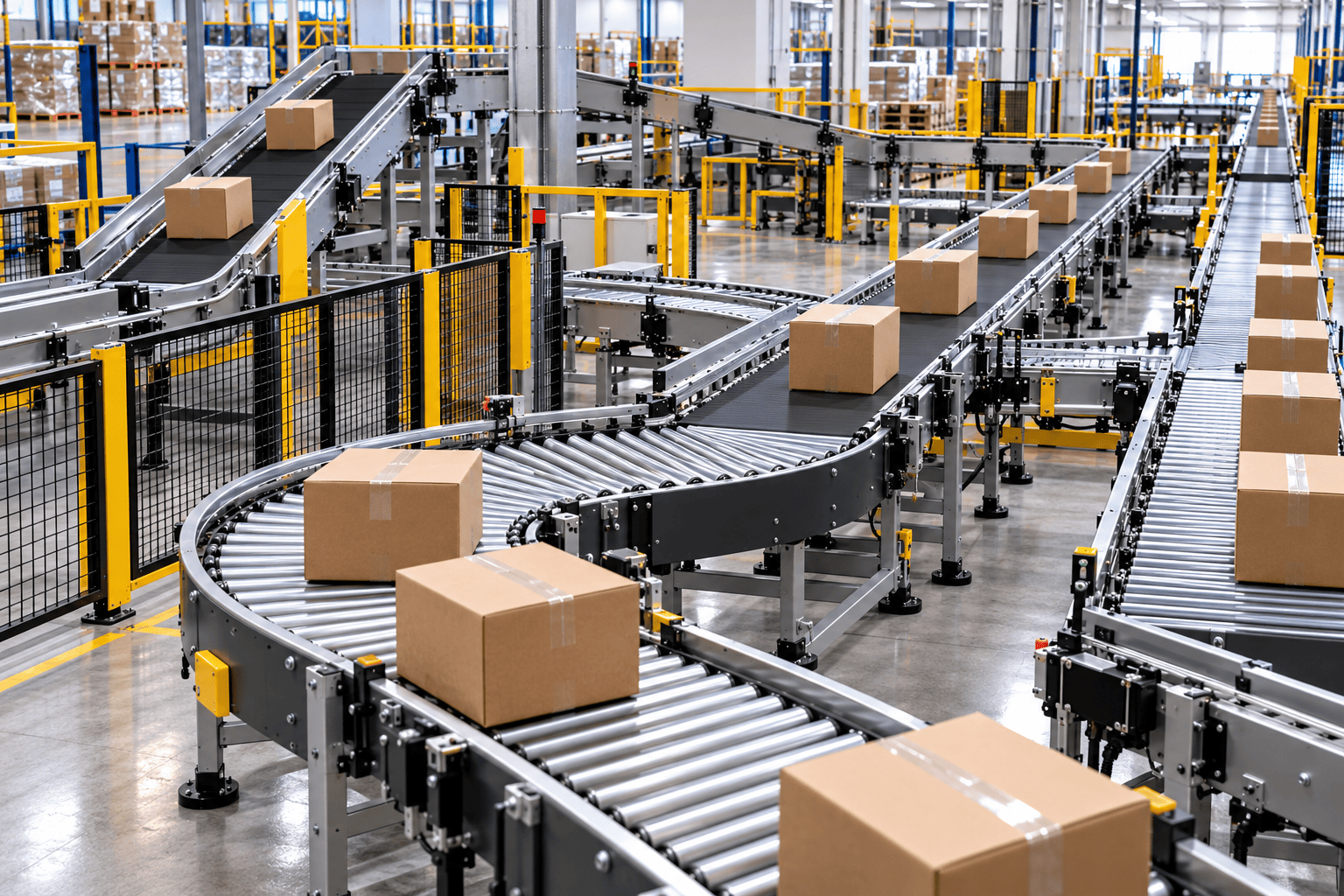
At 4:35 p.m. on installation day, the new conveyor is moving cartons cleanly from the packing line toward dispatch. The belt tracks correctly. The sensors respond. The electrical panel shows no fault. On the drawing, the route is complete.
Then the rest of the operation arrives.
The forklift driver stops at the first corner because the turning path has become too tight. A maintenance technician points out that the drive motor can be inspected, but not removed, without dismantling another section. The barcode scanner begins producing no-reads because cartons leave a curve at slightly different angles. An operator needs to reach the opposite side of the line and now walks around the entire route – unless somebody eventually decides to step over it.
This is an illustrative composite, not a claimed Convello customer incident. But the pattern is familiar in factories and warehouses: the conveyor fits inside the available rectangle, yet people, products, vehicles, maintenance and exceptions no longer fit around the conveyor.
That is why conveyor system layout design is not simply the act of drawing a line between Point A and Point B. It is the design of an operating condition.
Quick Answer: What Makes a Conveyor Layout Practical?
A practical conveyor layout moves the required products at the required rate while preserving stable transfers, controlled accumulation, safe access, service space, clear exception routes and reliable interfaces with people and machines. It should still work when a destination is full, a product is damaged, a scanner cannot read a label, a motor needs replacement or the facility introduces a new SKU.
The centreline drawing is only one layer. A complete layout should also show product envelopes, guides, support legs, drives, panels, cable routes, sensors, guard openings, pedestrian crossings, forklift swept paths, operator positions, maintenance-removal paths, drains, doors, columns, fire equipment, future extensions and the areas needed for installation.
| The practical rule | The conveyor has not been fully laid out until normal flow, abnormal flow and human access can all be explained on the same drawing. |
Why a Clean CAD Drawing Can Still Create a Difficult Operation
A clean drawing naturally favours geometry. It rewards short routes, neat right angles and tightly packed equipment. The operation, however, is judged by different questions: Can the product transfer without tipping? Can the operator see the fault? Can maintenance remove the component? Can a trolley pass? Can the line recover after a stop? Can the next truck, SKU or machine be added without rebuilding everything?
Many layout problems are created by missing evidence rather than poor intention. The average carton is drawn, while the smallest and widest cartons are not. The rated machine speed is used, while blocked and recovery states are ignored. A walkway is shown as a white strip, but the person carrying tools, moving a pallet jack or opening a guard is not represented.
The drawing looked efficient because no one drew the operator. That is a layout problem, not an operator problem.
Draw Five Journeys Before Selecting Conveyor Modules
Before choosing belt, roller, curve, transfer or vertical modules, draw five journeys. They do not need to be beautiful. A marked-up floor plan, photographs and a short process video are often more useful at this stage than a polished 3D model.
| Journey | Questions to answer | Common layout consequence |
| 1. Normal product flow | Where does a good product start, stop, change direction, change height, get inspected and leave the system? | Defines the main conveyor route, product orientation and equipment interfaces. |
| 2. Exception and rework flow | Where does a no-read, damaged, rejected, quarantined or rework product go? How does it return? | Requires reject spurs, manual recovery positions, gates, re-entry control or separate lanes. |
| 3. People flow | Where do operators stand, replenish, inspect, clean, cross and recover faults? | Defines workstations, crossings, access gates, reach distances and line-of-sight needs. |
| 4. Vehicle flow | Where do forklifts, pallet trucks, trolleys and loading vehicles turn, wait and pass? | Affects barriers, clearances, floor protection, dock interfaces and collision risk. |
| 5. Service and maintenance flow | How are motors, rollers, belts, guards, sensors and panels inspected, isolated and removed? | Defines service envelopes, lifting access, panel location, spare-part handling and shutdown space. |
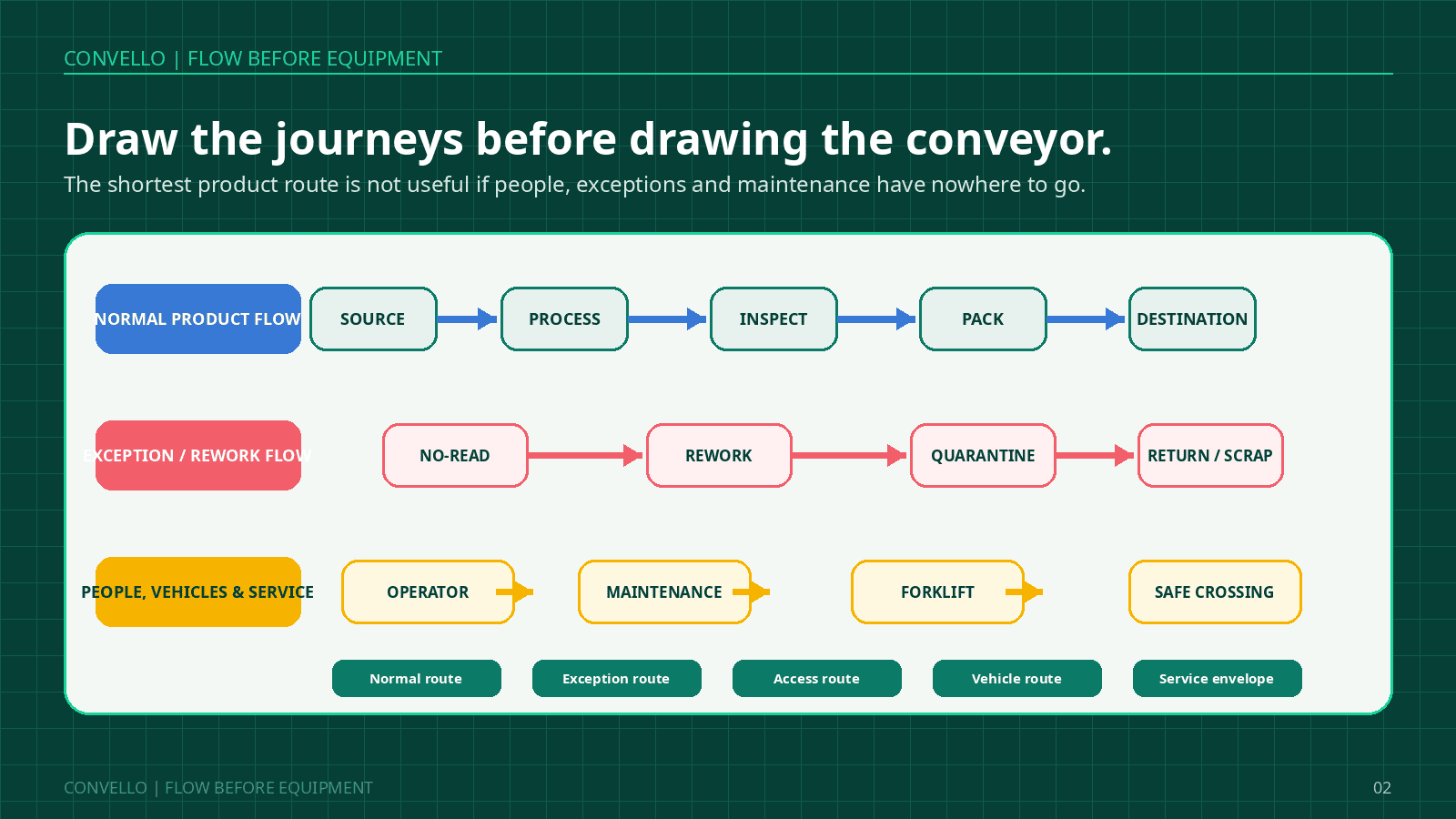
Figure 1. Draw the product, exception, people, vehicle and service journeys before choosing conveyor modules.
MHI conveyor and sortation guidance likewise treats load type, origin and destination, desired throughput, interfaces with existing equipment and associated lifecycle considerations as connected specification inputs. The practical lesson is simple: a route cannot be selected in isolation from what moves through it and what surrounds it.
15 Practical Conveyor System Layout Design Decisions
The following decisions are written as floor-level questions. They should be reviewed by operations, maintenance, engineering, controls, quality and safety before fabrication drawings are frozen.
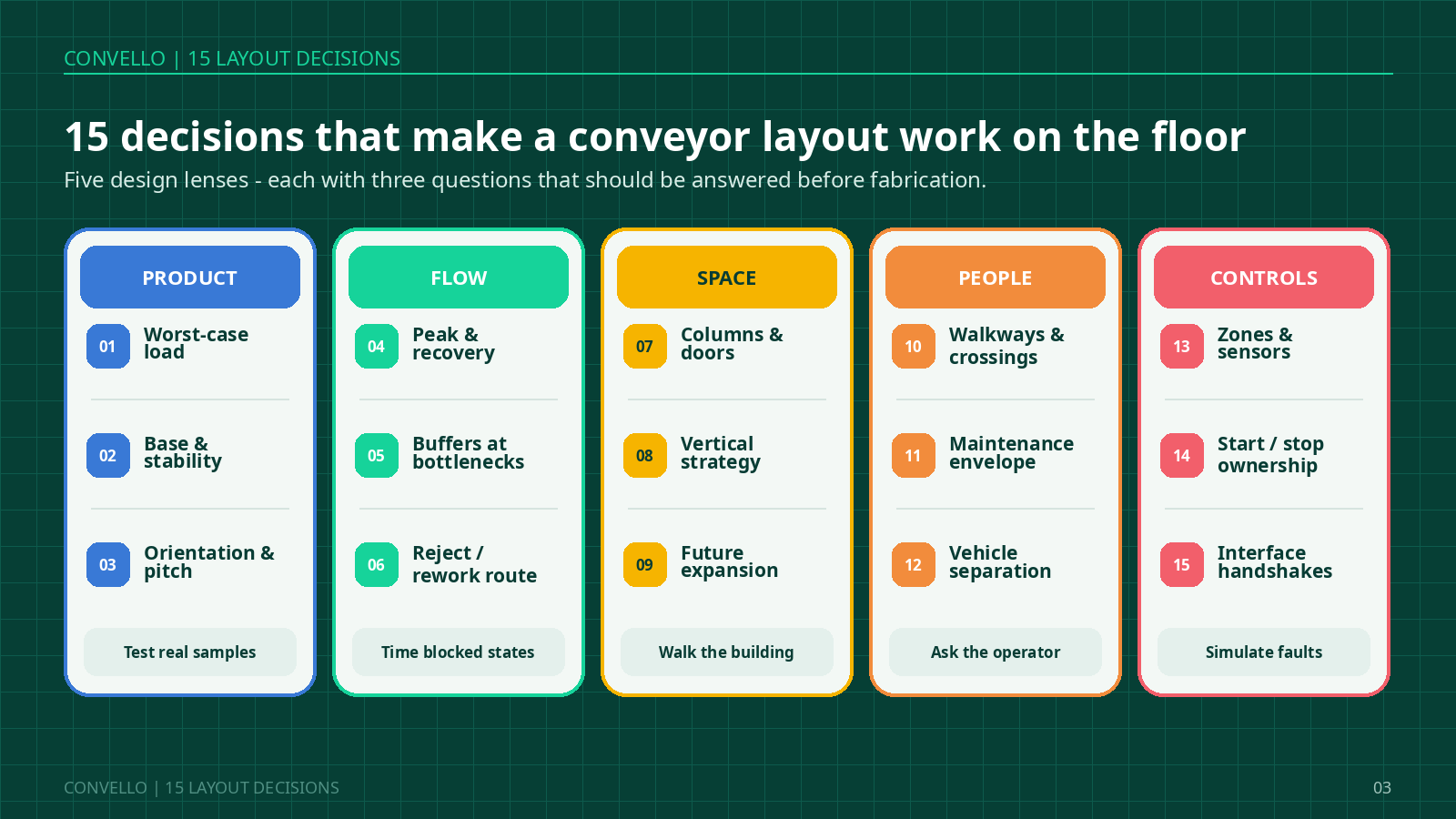
Figure 2. Fifteen layout decisions grouped under product, flow, space, people and controls.
1. Design for the Worst Accepted Load – Not the Average Sample
The average carton usually travels well. The layout should be checked with the smallest, widest, tallest, heaviest, lightest and least stable accepted items. Include dented cartons, overfilled bags, trays with flexible bases, pallets with imperfect bottom boards and products whose centre of gravity is offset.
Why it changes the layout: the worst accepted load determines roller pitch, belt support, guide position, transfer gaps, curve radius, incline grip, sensor location and the size of reject or recovery areas.
2. Record the Product Base, Stability and Required Orientation
Two packages with the same length and weight can behave differently if one has a rigid flat base and the other has a soft, ribbed or uneven underside. Also define whether the product may rotate, must keep a leading edge, needs label visibility or must arrive in a controlled orientation for a robot, scanner or operator.
Human clue: when operators repeatedly hold, rotate or straighten products, they are often compensating for an orientation problem that belongs in the layout.
3. Treat Every Transfer Point as a Small Machine
A transfer is not just the gap between two conveyor frames. It has an incoming speed, outgoing speed, support condition, height relationship, product trajectory, guide transition and fault-recovery method. Short products may nose-dive; soft bags may bridge; high products may tip; pallets may strike stops or side frames.
Lay out enough space to support the product, mount the chosen transfer device, protect pinch points and allow access to remove a trapped product safely. Transfer decisions should be proven with samples whenever behaviour is uncertain.
4. Use Sustained Peak Flow and Recovery Rate – Not Only Rated Speed
A machine may be rated for a high instantaneous output, yet the conveyor system may experience waves, shift changes, batch releases, quality holds and blocked destinations. Record average flow, sustained peak flow, short burst flow, stop frequency, typical stop duration and the rate at which the downstream process can recover.
A layout that can carry the normal rate but cannot recover from a routine stop will gradually turn operators, trolleys and floor space into an unofficial buffer.
5. Put Accumulation Where It Protects the Process
Accumulation should absorb a defined mismatch between processes. It should not be added everywhere simply because space is available. Place it before a known bottleneck, inspection point, merge, sortation destination or machine that experiences short stops.
A buffer is not a waiting room for defects. If the downstream process is chronically slower, extra conveyor may only delay the moment when the line stops. The layout should show what triggers accumulation, what happens when the buffer is full and how the line recovers.
6. Draw the Exception Route at the Same Time as the Normal Route
No-read, reject, rework, quarantine, sample and damaged-product routes are often added after the main line. By then, only awkward floor space remains. The result is a bin in a walkway, a manual lift across the conveyor or an operator carrying products backwards against the flow.
Define where an exception leaves the line, how it is identified, who owns it, how capacity is monitored and whether it can re-enter without creating a duplicate record or product mix-up.
7. Survey Columns, Doors, Utilities, Drains and Floor Conditions
The available rectangle on a layout may contain a column base, fire equipment, electrical panel, trench, drain, expansion joint, floor slope, dock leveller, low beam, pipe rack or door swing. These details affect support positions, anchor locations, conveyor height, electrical routing, cleaning and installation access.
Walk the route with photographs and measurements. A dimension taken from an old drawing should be verified on the floor, especially in an operating plant that has changed over time.
8. Decide Whether to Go Around, Over or Between Levels
Curves, cross transfers, inclines, spirals and lifts solve different spatial problems. A long incline may consume significant floor length. A spiral can reduce footprint but creates circular product travel and its own access needs. An elevated conveyor may release floor space but requires guarding, spill protection, support structure and practical access.
The correct vertical strategy depends on product stability, required throughput, available headroom, maintenance access and how people or vehicles use the area below.
9. Reserve Space for the Next Change
Future flexibility is not achieved by writing “expandable” in a proposal. It requires physical and control provisions: a straight section that can accept a future spur, spare panel capacity, network points, a support arrangement that permits extension, and floor space that operations will not permanently fill with storage.
Ask what may change over the next 12 to 36 months: product sizes, destinations, throughput, packaging machines, dock doors, inspection equipment, shifts or automation level.
10. Preserve Walkways, Crossings and Operator Positions
The shortest route for cartons can become the longest route for people. Mark every routine crossing and observe why it exists. People may need to replenish packaging, inspect labels, empty reject bins, clean a spill, reach a panel or respond to a jam.
Where a crossing is necessary, engineer it as part of the system rather than allowing stepping over or crawling under the conveyor. The final dimensions and protection should follow the site risk assessment and applicable requirements.
11. Draw a Maintenance Envelope Around Serviceable Components
A motor that can be seen is not necessarily a motor that can be removed. Show the space needed to open a guard, withdraw a shaft, lift a drive, change a belt, pull a roller, reach a tensioner, open an enclosure and use tools without entering another hazard.
Maintenance clearance that exists only after removing a handrail, shifting another machine or dismantling an unrelated conveyor is not useful maintenance clearance.
12. Separate Forklift, Pallet-Truck and Conveyor Conflict Points
Forklifts need more than a centreline route. They need a swept turning envelope, visibility, stopping room and space to approach loads. Conveyor supports, control cabinets and low frames are vulnerable when placed inside vehicle paths.
Use barriers, bollards, marked routes, protected supports or a different conveyor elevation where the risk assessment requires them. Also check the operating state: a forklift path that works when the conveyor is empty may not work when pallets or totes accumulate beside it.
13. Give Scanners, Scales and Sensors the Product Condition They Need
A sensor can be mounted almost anywhere; it will not perform equally well everywhere. Products leaving a curve, incline, transfer or merge may still be skewed, vibrating, touching or changing speed. Scanners, dimensioners, checkweighers, print-and-apply systems and vision equipment may need a verified straight and controlled section.
Confirm the equipment supplier requirements and test the smallest, largest and poorest accepted packages. Do not treat the sensor symbol as a zero-length object on the layout.
14. Define Control Zones, Stops, Reset and Restart Ownership
The physical layout and control philosophy should be developed together. Define conveyor zones, product-present sensors, blocked and starved states, accumulation behaviour, merge priority, full-destination logic, fault indication, emergency-stop coverage, isolation points and the conditions for restart.
Ask a simple question at each interface: if the downstream equipment cannot accept a product, what exactly does the upstream conveyor do – and who sees that condition?
15. Freeze the Layout Only After Interface Owners Agree
Every connection needs an owner: conveyor to machine, machine to conveyor, conveyor to building, electrical supply to panel, PLC to scanner, dock to vehicle, operations to maintenance and supplier to installer. Unowned interfaces become change orders and commissioning delays.
The final review should include approved drawings, representative product samples, signal lists, load data, service clearances, installation responsibilities, blocked-line scenarios, acceptance criteria and a documented list of assumptions.
How Conveyor Type Changes the Layout
The same building can support several conveyor concepts, but each type changes the space, access and interface requirements. The table below is a planning comparison, not a substitute for project engineering.
| Conveyor type | Useful layout strength | Layout point that needs attention |
| Belt conveyor | Continuous support for mixed products, bags, small items and inclines. | Return path, pulley and take-up access; belt tracking; cleaning; transfer gaps; drive and tensioning space. |
| Gravity or powered roller conveyor | Efficient for stable flat-bottom cartons, totes and selected pallets; simple straight transport and accumulation options. | Roller pitch, product support, drive-side guarding, curves, soft packages and transfer geometry. |
| Curve roller or belt curve | Changes direction while keeping continuous product movement. | Product swept envelope, inside/outside guide positions, stability, entry alignment and radius. |
| Cross transfer / pop-up transfer | Moves loads between perpendicular or parallel lines without a long curve. | Lift stroke, support points, cycle time, product underside, guarding and recovery access. |
| Pallet conveyor | Controlled movement of heavy unit loads and automation-cell interfaces. | Floor loads, pallet runner direction, accumulated section load, forklift interfaces and heavy-component service access. |
| Incline, spiral or vertical transfer | Moves products between elevations and can release floor space. | Product grip and stability, horizontal run or footprint, headroom, guarding, access and failure recovery. |
| Telescopic or flexible conveyor | Adapts the route for truck loading, temporary dispatch or changing dock positions. | Vehicle movement, cable management, stability, operator position, storage space and daily setup. |
| Screw or bulk conveyor | Enclosed or controlled movement of powders, granules and selected bulk materials. | Inlet and discharge arrangement, hopper loads, supports, dust control, cleanout and drive-removal access. |
Four Calculations to Complete Before Layout Freeze
Calculations do not decide the layout by themselves, but they expose whether a proposed route is physically credible. Keep units consistent and validate assumptions with the equipment supplier.
1. Product Release Pitch and Conveyor Speed
| Planning formula | Required conveyor speed = product pitch x products per unit time. Product pitch includes the product length in the travel direction plus the operating gap. |
Example: if cartons require a 0.60 m pitch and the target is 30 cartons per minute, the theoretical speed is 18 m per minute. Acceleration, transfers, tracking, inspection equipment and downstream acceptance still need to be checked; the formula is a starting point, not a final motor specification.
2. Accumulation Positions
| Planning formula | Theoretical queue = upstream arrival rate x expected blocked duration. Add a justified allowance for detection delay, product variation and recovery – or reduce the stop duration instead of simply adding conveyor length. |
Illustrative example: a line feeds 36 cartons per minute and a routine downstream stop lasts 75 seconds. The theoretical queue is 45 cartons. Adding a 25% planning allowance gives about 57 positions. At a 0.55 m pitch, a single straight lane would require more than 31 m of accumulation. That result may show that the real solution is faster fault recovery, zone control, a different buffer format or removal of the bottleneck – not 31 m of extra conveyor.
3. Incline Horizontal Run
| Geometry formula | Horizontal run = vertical rise / tan(incline angle). The conveyor length is longer than the horizontal run and must also include transition geometry. |
Illustrative example: a 3 m rise at 12 degrees needs about 14.1 m of horizontal run before transitions and interfaces are added. This is why spiral or other vertical-transfer options may be reviewed where floor space is limited. Product stability and access may still make a conventional incline the better choice.
4. Roller Support
For stable flat-bottom unit loads, a common planning rule is to keep at least three rollers beneath the shortest product. Interroll planning guidance describes this principle and notes that pallets and concentrated loads require additional load-distribution checks. The final roller pitch must reflect the product base, load, roller capacity and test results.
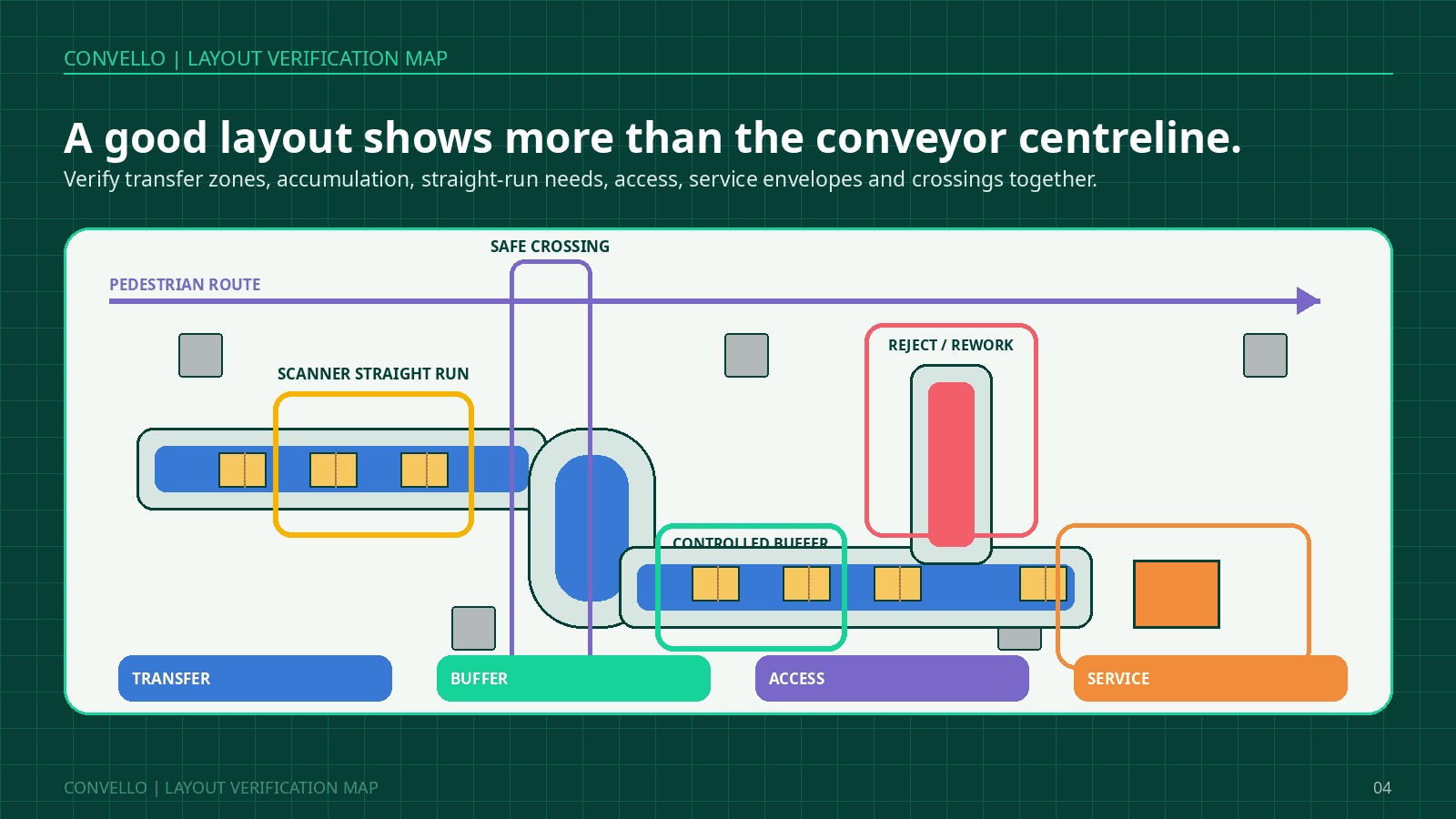
Figure 3. The final plan should show transfer, buffer, access and service conditions – not only a conveyor centreline.
A Human-Centred Packaging-Line Example
Consider a packaging line that moves sealed cartons through label application, barcode verification, checkweighing, carrier sortation and dispatch. The first concept is compact: a 90-degree curve feeds directly into the scanner, the checkweigher follows immediately, and the drive sits between the conveyor and a wall.
On paper, the arrangement saves floor space. During a floor review, the team finds four issues. Cartons leave the curve at slightly different angles. A no-read has no destination except the main walkway. Maintenance cannot withdraw the drive. When the carrier lane is full, the entire line stops and packers begin placing cartons on the floor.
| Design question | Initial compact concept | Revised practical concept |
| Scanner condition | Scanner positioned immediately after a curve. | Verified straight and controlled approach based on scanner and product tests. |
| No-read handling | Operator lifts the carton from the main line. | Dedicated reject spur or controlled stop position with clear ownership and capacity. |
| Blocked destination | Whole line stops after the sort lane fills. | Zoned accumulation before the sorter, full-lane logic and a defined recovery sequence. |
| Maintenance | Drive installed against a wall. | Drive placed on the service side with a documented removal envelope and isolation access. |
| Operator crossing | Shortest walking path crosses the conveyor informally. | Crossing relocated or engineered as part of the route after pedestrian-flow review. |
| Future carrier | No spare destination or controls capacity. | Reserved physical interface, panel capacity and documented expansion assumptions. |
The revised line may occupy slightly more planned space, yet it uses less emergency floor space because cartons, people and maintenance no longer spill into areas that were never intended to support the process.
The Sixty-Minute Conveyor Layout Walk
A useful layout review can begin with one hour on the floor. Bring the current drawing, a tape or laser measure, sample products, a camera where permitted and representatives from operations, maintenance, engineering, controls, quality and safety.
| Participant | Question to ask while walking |
| Operator | Where do you wait, carry, reach, turn, straighten, cross or improvise? |
| Maintenance | Can the motor, roller, belt, guard, sensor and panel component be inspected and removed with normal tools? |
| Quality | Where does a no-read, reject, hold, sample or rework item go, and how is identity protected? |
| Controls / IT | What does every upstream zone do when the next interface is blocked, faulted or offline? |
| Safety | How do people cross, stop, isolate, clear a fault and restart without unexpected movement? |
| Facility / projects | Which columns, doors, services, floor conditions, shutdown windows and future changes affect the route? |
| Human-centred design question | Where do people wait? Where do they carry? Where do they improvise? Every repeated workaround is evidence that should be tested against the proposed layout. |
Eight-Step Conveyor Layout Design Workflow
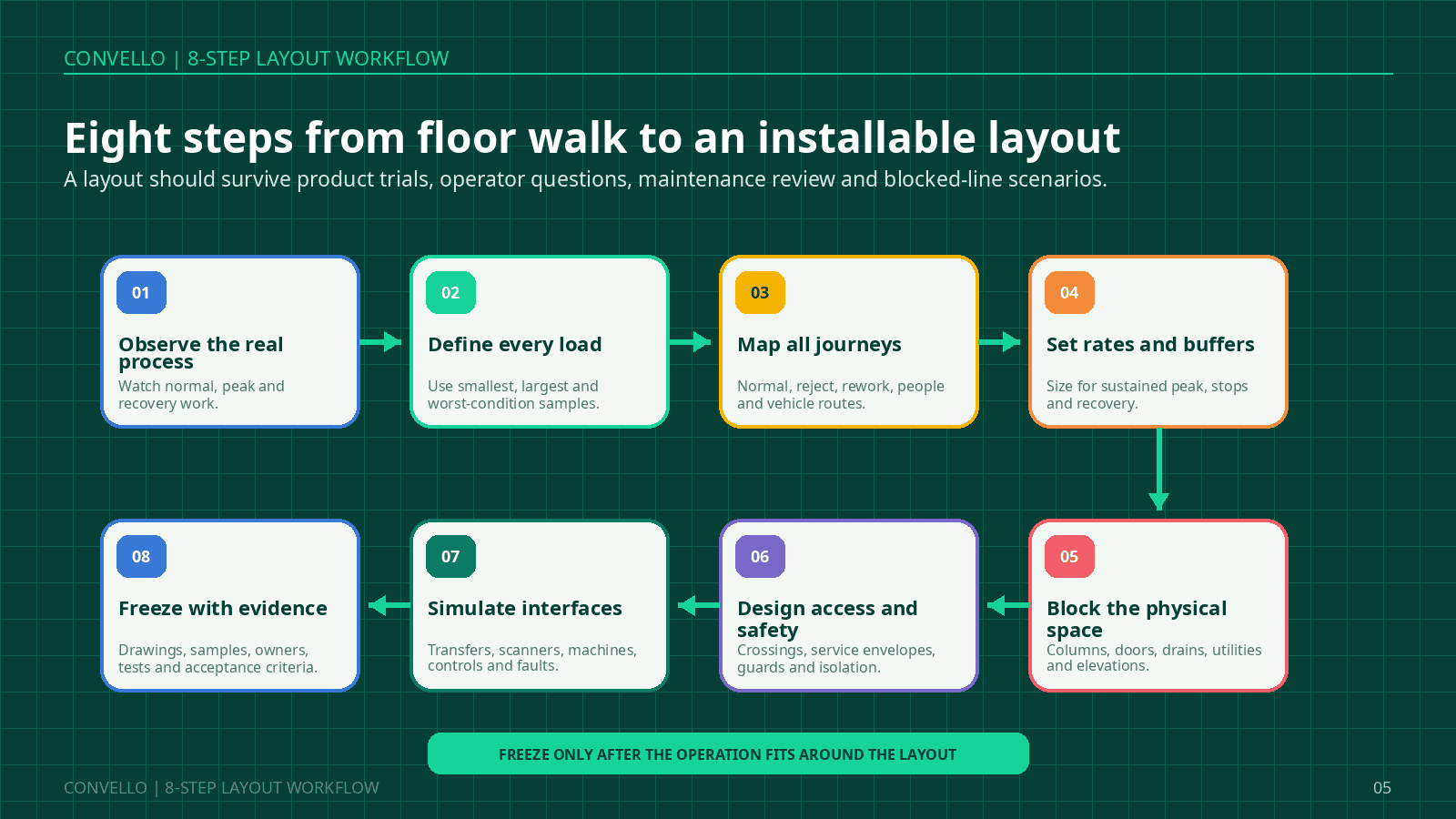
Figure 4. Freeze the layout only after product trials, operator questions, maintenance review and blocked-line scenarios.
1. Observe the real process
Watch a normal period, a peak period and at least one recovery from a stop. Record manual carrying, queue points, temporary storage and unofficial routes.
2. Define every accepted load
Create a product envelope using dimensions, weight, underside, stability, temperature, packaging condition and required orientation. Keep representative samples.
3. Map all journeys
Draw normal, exception, rework, people, forklift and maintenance routes. Mark sources, destinations, elevations and interface owners.
4. Set rates and buffers
Use sustained peak, stop duration and recovery rate. Identify the real bottleneck before sizing accumulation.
5. Block the physical space
Survey columns, doors, drains, utilities, panels, fire equipment, vehicle paths, floor levels and installation access.
6. Design access and safety together
Plan crossings, guarding, emergency-stop coverage, isolation, recovery access, service envelopes and safe restart as part of the layout.
7. Simulate interfaces and faults
Review transfers, scanner requirements, machine handshakes, full destinations, no-reads, jams, power loss and manual recovery.
8. Freeze with evidence
Approve drawings, assumptions, samples, signal lists, responsibilities, tests, documentation and acceptance criteria before fabrication.
Information to Share for an Accurate Conveyor Layout and Quote
| RFQ topic | Information to provide |
| Products | Minimum and maximum dimensions, weight, underside, stability, orientation, packaging condition, temperature and representative photos or samples. |
| Flow | Source and destination, normal rate, sustained peak, burst rate, duty cycle, stop durations, accumulation and recovery expectations. |
| Process interfaces | Upstream and downstream machines, working heights, handshake signals, operator tasks, inspection points, scanners, scales and reject routes. |
| Facility | Current plan and elevations, columns, doors, clear heights, floor levels, drains, utilities, dock conditions and restricted areas. |
| People and vehicles | Operator positions, crossings, cleaning routes, maintenance approach, forklift and pallet-truck paths, pedestrian traffic and loading activity. |
| Controls and safety | Existing PLC or WCS, network requirements, safety philosophy, emergency-stop zones, isolation points, alarms, access gates and restart method. |
| Installation | Available shutdown, delivery route, crane or lifting access, storage space, civil and electrical responsibilities, work permits and site working hours. |
| Future change | Expected SKUs, throughput growth, new destinations, planned machines, facility expansion and preferred modular interfaces. |
| Acceptance | Product trial matrix, capacity test, blocked-line tests, noise or hygiene needs, documentation, training, spares and handover criteria. |
Common Conveyor Layout Mistakes
| Mistake | Why it creates problems |
| Designing around the average product | Small, unstable, damaged or oversized accepted products fail at rollers, guides, curves and transfers. |
| Using only the rated machine speed | The layout ignores wave release, blocked states, recovery rate and real sustained peak flow. |
| Adding accumulation without a blocked-line strategy | The buffer fills, but the controls, ownership and recovery method remain undefined. |
| Putting scanners or scales wherever space remains | The product may still be skewed, vibrating, touching another product or changing speed. |
| Drawing walkways but not tasks | A walkway exists on paper, yet the operator cannot open a guard, empty a reject bin or reach a control. |
| Placing drives against walls or other machines | Routine inspection may be possible while replacement, lifting and safe isolation are not. |
| Ignoring forklift swept paths | Frames, supports, cabinets and accumulated products become collision points. |
| Leaving exceptions until commissioning | Rejects, no-reads and rework are handled with bins, carrying and temporary floor space. |
| Freezing mechanical and controls layouts separately | Sensors, zones, stops, panels and interface logic arrive late or conflict with physical access. |
| Treating future expansion as a note | No real floor, panel, network, support or interface capacity is reserved. |
| Approving only from CAD | Representative product trials and the knowledge of operators and maintenance are excluded. |
Frequently Asked Questions
1. What is conveyor system layout design?
It is the process of defining how products, people, vehicles, equipment, controls and services will interact around a conveyor route. It includes plan and elevation geometry, transfers, supports, buffers, access, interfaces, safety and installation conditions.
2. What information is needed before drawing a conveyor layout?
At minimum, provide product dimensions and weight, underside and stability, source and destination, normal and peak rate, building plan, elevation changes, machine interfaces, operator tasks, vehicle routes, exception handling and future expansion.
3. How much floor space does a conveyor system need?
There is no universal allowance. Required space includes the conveyor frame plus guides, supports, drives, panels, product overhang, curves, service envelopes, guarding, crossings, installation access and surrounding operating routes.
4. How does belt conveyor layout differ from roller conveyor layout?
A belt provides continuous support and can suit bags, small items and inclines, but needs return-path, tracking, pulley and take-up access. Rollers suit stable flat-bottom loads and accumulation, but roller pitch, drive arrangement and product support strongly affect the layout.
5. How should conveyor accumulation be sized?
Begin with arrival rate multiplied by the expected blocked duration, then review detection delay, product pitch, recovery rate, available space and the consequence of a full buffer. If the required length is excessive, address the stop or bottleneck instead of only adding conveyor.
6. Can a conveyor cross a pedestrian walkway?
A crossing may be possible, but it should be engineered and risk-assessed as part of the system. The solution may involve rerouting, a gate, a designed crossover, elevation or another method. Informal stepping over or moving under a conveyor should not become the operating method.
7. What is a maintenance service envelope?
It is the area required to inspect, open, isolate, remove and replace a component using the expected tools and lifting method. It should be shown around motors, pulleys, take-ups, belts, rollers, guards, panels, sensors and other serviceable equipment.
8. Why do scanners and checkweighers need special layout attention?
They may require controlled orientation, spacing, speed and a stable straight approach or discharge. A product leaving a curve, transfer or merge may not yet be in the condition the equipment needs.
9. Can a conveyor layout be designed for an existing operating plant?
Yes, but the survey should verify actual dimensions, floor conditions, utilities, traffic, installation routes and shutdown constraints. Old drawings alone may not reflect changes made to the facility.
10. How should future expansion be included?
Reserve physical interfaces, support options, panel and network capacity, control addresses and access to the future route. Document which product and rate assumptions the expansion provision is intended to support.
11. Is conveyor layout software enough to validate the design?
Software helps visualise geometry, product flow and conflicts, but it does not replace representative product testing, floor verification, risk assessment or review by operators, maintenance and interface owners.
12. When should a conveyor manufacturer be involved?
Involve the manufacturer while product, route and interface decisions can still change. Early evidence reduces assumptions and allows conveyor type, transfers, drive arrangement, controls, access and installation scope to be developed together.
Final Takeaway: Design the Space Around the Conveyor
A reliable conveyor layout is not the tightest route that fits inside a building. It is the route that still works when products vary, destinations block, people cross, components need replacement and the operation changes.
Start with the actual journeys. Define the worst accepted load. Treat transfers and interfaces as engineered decisions. Put buffers where they protect the process. Preserve access for operation, cleaning and maintenance. Show abnormal flow before fabrication. Then freeze the layout with evidence, owners and acceptance criteria.
| Discuss your conveyor layout with Convello | Share the products, rates, facility plan, source and destination points, height changes, equipment interfaces, operator and vehicle routes, current bottlenecks and future expansion plans. Convello can review the application and develop a conveyor concept around the complete operating requirement. |